This page is built for security architects, IT directors, compliance stakeholders, and technical evaluators modernizing secure external communications. It covers each authentication method, where it fits, and how your teams keep control. [By sender → By recipient → By message risk]
Authentication Options. Flexible Access. Absolute Control.
Authentication is where your security policy meets the recipient. Get it wrong, and you flood IT with reset tickets, stall regulated communications, and leave gaps that invite account takeover. Echoworx gives you a full suite of authentication methods—governed by one policy engine—so every recipient verifies the right way, every time. Less friction. Tighter control. Consistent governance across every external exchange.

Authentication as a Governance Tool
Authentication is not just a login screen. It is a control. You set the policy by sender, recipient, or message risk. The Echoworx encryption platform enforces it consistently, so protection never depends on a manual step.
This aligns directly with the frameworks already on your board agenda—DORA, NIS2, GDPR, PCI-DSS, and NIST SP 800-63—where the burden of proof matters as much as the control. Set policy by sender, by recipient, or by message, and you get a graduated verification model matched to the sensitivity of each exchange.
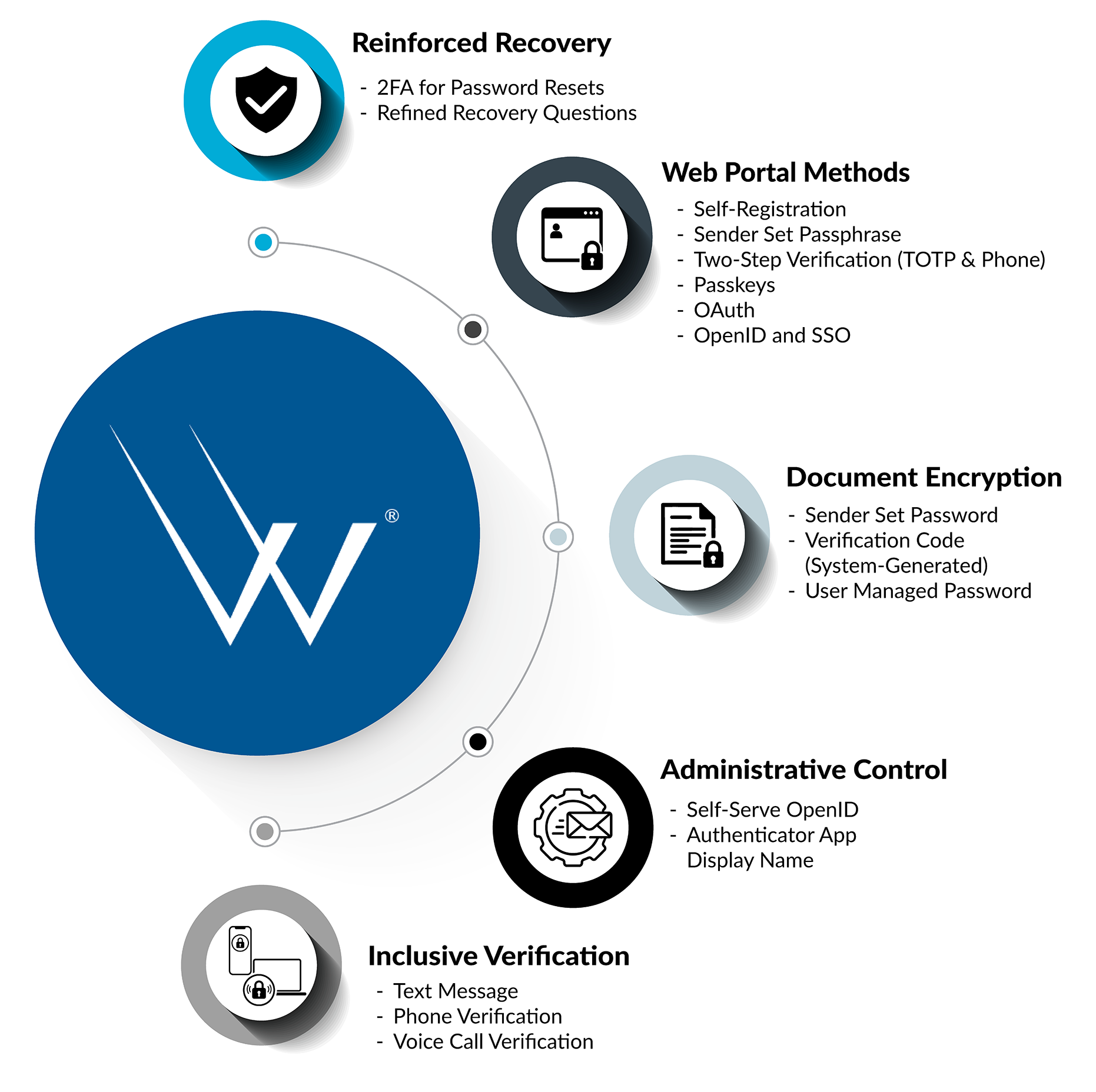
Echoworx gives you a full suite of authentication methods—governed by one policy engine.
Web Portal Authentication
The Secure Web Portal supports recipients without certificate infrastructure. Each method removes a specific point of friction while strengthening your posture.
-
Self-Registration
Recipients create and manage their own portal credentials through a self-service interface—cutting the reset-ticket overload that drains IT time. For first-time registration, enforce an added layer with a sender-provided second-factor code, solving the “first contact” trust problem instantly.
-

Sender Set Passphrase
The sender defines a shared passphrase and communicates it out of band. The recipient enters it for immediate access to the secure message and its attachments. No registration. Ideal for one-off exchanges that must move at the speed of business.
-

Passwordless Access and Passkeys
Device-based authentication using biometrics or passkeys removes the inherent weakness of user-created secrets. Supported recipients sign in with a biometric or PIN-backed passkey—a phishing-resistant, single-step experience, especially smooth on mobile.
-

OpenID and Single Sign-On (SSO)
This is where authentication becomes a strategic governance asset. Self-serve OpenID and SSO configuration ties access to your corporate identity provider, so users authenticate through the portal they already trust. You centralize access control, enforce your own multi-factor policies, and eliminate password chaos for users and administrators alike.
Managing administrator access across platforms? See Streamlined Administration below for self-serve OpenID provider settings.
-

Social Connectors (OAuth)
Why force users to create another password? Social Connectors enable one-click access through trusted providers such as Office 365, Google, or LinkedIn. You remove the “new account” barrier and leverage the security frameworks of major identity providers.
-

Two-Step Verification (2FA)
A compromised password is the oldest exploit in the book. Two-Step Verification layers a second factor on the recipient’s primary credential, defending against credential stuffing and phishing while helping meet compliance requirements including PCI-DSS. Recipients confirm access with a one-time code delivered through an inclusive verification channel below, or through a TOTP authenticator app.
-
Inclusive verification channels
Text Message:
A one-time code is delivered to the recipient’s mobile device.
Phone Verification:
The recipient’s phone number drives verification through text or call.
Voice Call Verification for 2-Step Verification:
When a recipient lives in a rural area, has accessibility needs, or cannot receive a text message, Echoworx delivers the verification step through a voice call instead.Inclusive verification widens reach without weakening control. Regulated communications still complete, even when a recipient’s primary channel fails.
Document Encryption Authentication
Sensitive data does not stop being sensitive once attached to an email. Echoworx extends flexible, policy-controlled access directly to encrypted PDFs, Office files, and ZIP archives—from creation to destination.

Sender Set Password
The sender creates and shares a password for an encrypted attachment at the moment of sending, then communicates it out of band. A direct, no-fuss method for quick, controlled exchanges.
System-Generated Verification Code
A unique, on-the-fly code unlocks the encrypted document. The sender securely communicates it to the recipient—over the phone, for example—and the recipient enters it to instantly access the secure PDF or attachments. No registration, no standing password, no delays. Robust security that works at the speed of human interaction.
User Managed Password
A self-managed password the recipient reuses to access encrypted attachments. It builds a consistent, trusted workflow for recurring exchanges with clients and partners, reducing sender burden across ongoing secure file sharing.
Reinforced Account Recovery
Weak recovery flows invite account takeover. Echoworx aligns recovery security to login security, so the back door is as strong as the front.
-
2FA for Password Resets
Attackers bypass strong logins through weak resets. Protect the recovery process with Phone Verification (text or call) or TOTP, and replace static challenge questions with a genuine second factor. The result meets modern NIST SP 800-63 authentication standards and aligns recovery to your login posture.
-
Refined Recovery Questions
For environments that still require them, updated challenge questions bridge legacy requirements and modern security frameworks. Standard prompts include identifiers such as a favourite teacher, a first workplace manager, or a first school.
Streamlined Administration and Absolute Control
Echoworx places more control directly in your administrators’ hands, so the platform aligns to your precise corporate security policies.
-
Self-Serve OpenID Identity Provider Settings
Managing administrator access across multiple platforms creates password fatigue and security gaps. Configure administrator Single Sign-On directly through self-serve OpenID settings, integrate with your existing corporate identity provider, and centralize access control—without a support request.
-
Authenticator App Display Name
A dedicated enterprise property customizes the display name shown in authenticator apps. Set it once at the enterprise level, and it carries through to the authenticator experience—improving clarity for recipients and reinforcing brand consistency at the moment of verification.
Requirements and Compatibility
- Identity integration: OpenID Connect and OAuth for federated recipient access; SAML and OpenID for governed administrator SSO, with support for major providers including Microsoft 365 and Google.
- Second factors: Text Message, Phone Verification, Voice Call Verification, and TOTP authenticator apps.
- Standards alignment: Recovery and verification flows align to NIST SP 800-63; Two-Step Verification supports PCI-DSS requirements.
- Document formats: Encrypted PDF, Microsoft Office, and ZIP archives.
If a recipient cannot receive a text message, enable Voice Call Verification for 2-Step Verification as the inclusive fallback. To retire static challenge questions, switch recovery to Phone Verification or TOTP.
Modernize Access with the Same Discipline
Authentication is the front door to every secure exchange. Do not let it trail the infrastructure it protects. As you migrate to the cloud, consolidate identity, and tighten governance, bring authentication into the same motion—one policy engine, every method, full control. Echoworx aligns verification, recovery, and administration under a single governed model, built to keep pace with your modernization strategy.
Security Assurance & Certification Programs